

What this fixes: Corporate documents fail in practice for a simple reason. Too many people write them, and everyone writes slightly differently. The style guide exists, but it is applied late, manually, and under time pressure.
The result: days of last minute review cycles, endless comments, and senior time spent hunting for inconsistencies that a system should catch.
This page explains a solution using two Make.com scenarios that tackles that problem:
- Style rule creator: converts a style guide into structured rules that systems can apply.
- Style checker: applies those rules to a corporate PDF and outputs a clean violations file plus an editor friendly checklist.
Quick summary
These workflows target the repetitive work that slows teams down at the worst possible time:
- capitalisation consistency (Company vs company, Board vs board)
- titles and roles (Chair, NED, committee naming)
- dates and ranges (formats, shorthand ranges, spacing)
- hyphenation and compounds (timeframe, year end, decision making)
- abbreviations and defined terms (IAS 1, IFRS 1, etc)
- quotes and punctuation conventions
The system produces two outputs:
- Detailed violations (JSONL): one issue per line, with evidence and a suggested fix.
- Editing checklist (Markdown): a short, grouped summary that an editor can work through quickly.
Why style guides quietly fail
Most organisations have a style guide for capitalisation, defined terms, dates, numbers, hyphenation, abbreviations, and house style. It exists for a good reason, consistency builds credibility, especially in long, formal documents.
And yet, in practice, style guides are rarely applied cleanly. Annual Reports, IPO prospectuses, ESG reports, and bond documents are assembled from dozens of contributors and multiple advisers. Even if everyone writes well, you still get:
- inconsistent house style across sections
- contradictions in capitalisation, abbreviations, and hyphenation
- the same term written three different ways across the document
- late stage review cycles that are mostly mechanical checking
This workflow shifts that checking earlier, standardises it, and makes it repeatable across drafts.
The two make.com scenarios
1) Style rule creator (turn a style guide into rules)
Style guides are usually written for humans. They often include checkboxes, examples, and exceptions. That makes them hard to apply programmatically.
This scenario produces a structured rule pack with consistent fields (rule_id, preferred, what to avoid, and how to detect it). It also separates rules into three categories:
- Literal rules: fixed strings or phrases that are safe to detect cheaply.
- Regex rules: pattern based detection (still cheap), used for families of formats (dates, numeric ranges, spacing patterns).
- Context rules: rules that require judgement and meaning (for example, “Company” only when referring to the reporting entity). These are handled by the LLM phase only.
Outputs from the rule creator typically include:
- a parsed rules file (JSON) split into literal_rules, regex_rules, and context_rules
- a term lookup file used to build fast “mega regex” searches for literal terms
- an inventory list of rule ids and their intent, useful for review and versioning
2) Style checker (apply the rules to a corporate PDF)
This scenario ingests a PDF, extracts text, chunks it for cost control, runs cheap checks first, then uses an LLM only for the rules that need context.
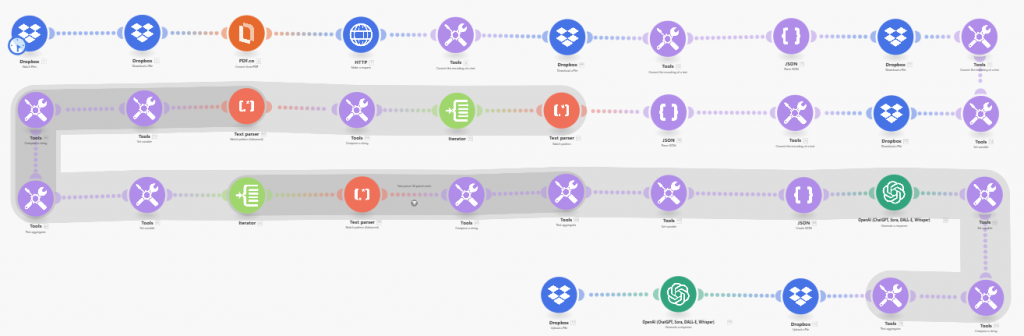
Outputs:
- Violations JSONL: machine readable, evidence based, easy to filter, deduplicate, and summarise.
- Editor checklist Markdown: short grouped actions with representative locations (page hints or chunk ids).
How it works (high level)
- Extract text from the PDF (keeping it as clean as possible).
- Chunk the text (for example 10k to 20k characters per chunk, depending on model and cost targets).
- Run literal detection (cheap, deterministic, high recall).
- Run regex detection (cheap, pattern based, good for families of errors).
- Run context checks with an LLM only where judgement is required.
- Aggregate the three streams into a single JSONL violations file.
- Summarise into an editor checklist for humans.
The key principle is gating: do cheap scanning first, then use an LLM only when it adds value.
Technical appendix
Architecture
- Inputs: PDF corporate document, parsed rules pack
- Processing: extract, chunk, detect (literal and regex), judge (context via LLM), aggregate
- Outputs: violations.jsonl, StyleCheckAudit.md
Data formats
Violations JSONL (one per line):
{"preferred":"...","rule_id":"R###","matched_text":"...","evidence_quote":"...","context":"...","suggested_fix":"...","page_hint":"..."}Why JSONL: it is easy to append, stream, split, and summarise. It also works well in Make.com for aggregating and passing downstream.
Cost control
- Chunking: keep chunk size stable and avoid rerunning expensive steps if nothing changed.
- Cheap first: run literal and regex detection before any context reasoning.
- High frequency terms: stop one rule dominating outputs. Cap repeated hits per rule per chunk (for example max 3) and keep representative examples for the checklist.
- Evidence limits: keep evidence_quote and context short to reduce tokens and keep outputs readable.
- Deduplication: merge and dedupe by rule_id plus a short hash of evidence_quote or matched_text.
Guardrails that prevent false positives
- Only audit the document text: never audit the rule text or prompt text.
- Evidence must be verbatim: evidence_quote should be copied from the chunk, not paraphrased.
- Matched text must appear in evidence: prevents invented matches.
- Truncation rules: enforce evidence and context length limits, either in prompt and also via post processing.
Common pitfalls and fixes
- Model “audits the rules” instead of the document: keep rule text clearly separated, and instruct the model to audit only CHUNK_TEXT.
- Literal rules over trigger: move ambiguous, high frequency terms into context rules, or add cheap gating patterns so they only trigger in the right situations.
- Strange glyphs in outputs: normalise non breaking spaces and control characters before summarisation.
- Location precision: if true page numbers are not available, use chunk index plus a short context snippet so an editor can search quickly in the PDF.
Resources:
- The Make.com scenario for the Style rule creator.
- The Make.com scenario for the Style Checker.
Costs:
Testing on a 177 page Annual Report (in pdf form) the process took 7 minutes to run. My calculations suggest that it cost about £2.70, with costs kept down through the use of gpt-4o-mini and gpt-5.1 rather than the currently more expensive gpt-5.2.